
2. Application Programming Interfaces (APIs)
⚠️ Tokens are required for access to most WHG API endpoints (see below).
Full, interactive API documentation is available at https://whgazetteer.org/api/schema/swagger-ui/
The World Historical Gazetteer (WHG) provides two complementary APIs:
2.1. Entity API
Access canonical representations of our entities: Places, Datasets, Collections, Areas, and PeriodO Periods.
Retrieve full metadata, names, types, geometries, temporal bounds, authority info, and linked resources.
Machine-readable feature endpoints return valid Linked Places Format (LPF) v1.1 for GIS and reconciliation tools.
2.1.1. Entity Endpoints
Endpoint |
Method |
Description |
|---|---|---|
|
GET |
Human-readable detail page (redirects to web app) |
|
GET |
Machine-readable LPF feature (JSON) |
|
GET |
HTML preview snippet |
Valid entity types: place, dataset, collection, area, period.
2.1.1.1. Distinguishing “does not exist” from “we could not ask”
Added in version 2026-09-21: /entity/{type}:{id}/api now answers 503 Service Unavailable when the upstream gazetteer service
does not respond, instead of 404. 404 means the record genuinely is not there.
This matters for anyone harvesting metadata at volume. Until now both cases returned a 404 that was
byte-identical but for the echoed id, so a transient upstream failure was indistinguishable from a
definitive “no such record” — and because the failures cluster when the service is busy, a client
sampling quickly banked absences biased toward exactly when it was going fastest, producing a silently
thinner dataset with nothing in the output to reveal it.
A 503 carries Retry-After and a gateway object:
{
  "detail": "The gazetteer service did not answer, so this identifier could not be resolved. ...",
  "gateway": { "answered": false, "error": "timeout" },   // error: timeout | connection | http | unexpected
  "place_id": "gn:13274771"
}
Important
Test for the presence of gateway, and treat 503 as “ask again later” — never as absence.
The condition is recoverable by waiting: over one measured set of ids, a third attempt minutes later
answered 30 of the 36 that had failed twice back to back. If you cache negative results, do not
cache a 503.
gateway.answered is a JSON boolean (false), not the string "false" — so if (!body.gateway.answered)
is safe.
2.1.1.2. When a source does not permit redistribution
Added in version 2026-09-21: /entity/{type}:{id}/api now answers 451 Unavailable For Legal Reasons for places whose source
authority is held under terms that do not permit WHG to redistribute its records. This applies to the
default LPF form and to ?variant=popup alike
(place#269).
Important
451, not 403 — and the difference is substantive. The constraint is on the content, not on
your permissions. No API token, account, tier or affiliation changes the answer.
Do not retry with credentials, and do not treat it as an authentication problem. A client that
escalates a 451 to its own support desk as a token failure will be chasing something that cannot be
fixed on this side.
The response identifies the source and where to obtain the data under its own terms:
{
  "detail": "<Source name> is indexed and searchable through WHG, but its terms do not permit WHG to redistribute its records. Obtain the data from the source under its own terms.",
  "namespace": "kain_par",
  "source": {
    "name": "...",
    "rights_holder": "...",
    "source_url": "...",
    "license": "<SPDX id or label>",
    "license_url": "..."
  }
}
Three namespaces are affected on production today, so a bulk harvester will meet this rather than
merely needing to handle it: kain_par (Ancient Parishes & Places of England & Wales), nl
(Native Land) and chgis (China Historical GIS). A further 73 registry entries are marked
redistributable and are unaffected.
Warning
A 451 is not an embargo, a takedown, or a sign that the data has gone. These namespaces remain
fully searchable and reconcilable, and are intended to stay that way. Search and reconciliation run
server-side and never hand a source’s own records to a third party; only the record-handover surface is
closed. Do not remove these namespaces from your namespaces filters, and do not record their places
as absent.
This is also a different mechanism from a gazetteer embargo, which hides a source from discovery surfaces entirely. The two share a word and nothing else; an embargoed source would not appear in search results at all, whereas these do.
Note
451 is terminal for that identifier — a permanent property of the record’s licence, not a
transient condition. Unlike 503 it will not succeed on retry, and unlike 404 it is not evidence
that the record does not exist. If you cache API outcomes, 451 is safe to cache; follow
source.source_url to obtain the data under the source’s own terms instead.
2.1.2. Place Identifiers and Source Namespaces
Place identifiers include a namespace prefix that indicates the originating source. For example:
place:169687— a WHG place (no prefix, or equivalentlywhg)place:gn:745044— a GeoNames placeplace:tgn:7010731— a Getty TGN place
Places served by the /api endpoint are returned in Linked Places Format (LPF) v1.1. Measured top-level keys, in order: @context, type, properties, @id, names, types, geometry, links, descriptions, depictions, relations, when, attribution. The examples below are abridged; attribution is always last. ⚠️ Not every indexed place is served by this endpoint: records whose source terms forbid WHG redistributing them answer 451 instead. They remain fully searchable and reconcilable.
You can use the namespaces parameter on Reconciliation and Suggest endpoints to restrict which sources are searched (see Source Namespaces).
Example: Fetching a GeoNames place
curl "https://whgazetteer.org/entity/place:gn:745044/api?token=<token>"
{
  "@context": "https://raw.githubusercontent.com/LinkedPasts/linked-places/master/linkedplaces-context-v1.1.jsonld",
  "type": "Feature",
  "@id": "https://whgazetteer.org/entity/place:gn:745044/api",
  "properties": {
    "title": "İstanbul",
    "ccodes": ["TR"],
    "source_id": "gn:745044"
  },
  "geometry": {
    "type": "Point",
    "coordinates": [28.94966, 41.01384]
  },
  "names": [
    {"toponym": "Constantinople", "lang": "en"},
    {"toponym": "Byzantium", "lang": "en"},
    {"toponym": "İstanbul", "lang": "tr"}
  ],
  "types": [{"identifier": "PPLA", "label": "P", "sourceLabel": "P.PPLA"}],
  "links": [],
  "when": {},
  "attribution": {
    "id": "gn",
    "name": "GeoNames",
    "description": "GeoNames geographical database. https://www.geonames.org/",
    "citation_text": "GeoNames geographical database, Unxos GmbH.",
    "rights_holder": "Unxos GmbH",
    "source_url": "https://www.geonames.org/",
    "license_url": "https://creativecommons.org/licenses/by/4.0/",
    "license__spdx_id": "CC-BY-4.0",
    "license__label": "Creative Commons Attribution 4.0 International",
    "license__url": "https://creativecommons.org/licenses/by/4.0/",
    "license__permits_commercial": true,
    "license__share_alike": false,
    "license__attribution_required": true,
    "license__custom": false,
    "downloadable": false,
    "redistributable": true,
    "download_blocked_reason": "volume-exceeds-cap"
  }
}
Important
The Entity API’s attribution block is a different shape from the one on multi-record responses,
despite the shared key name. Here it is flat, describes one source, and prefixes licence
fields with license__. On /reconcile and the bulk endpoints it is nested —
attribution.sources.<namespace>.license.spdx_id — and keyed by namespace because those responses can
span several licences at once. Code written against one will not read the other. See
Source Terms and Attribution for the multi-record shape.
redistributable is the one field carried by both shapes, at the top level of each source — so
whichever endpoint you are working against, it is the field that tells you in advance whether a
record can be dereferenced at all.
Two fields here are routinely misread:
license_urlandlicense__urlare both present and duplicate each other. Preferlicense__url, which sits with the rest of the licence fields.downloadable: falsealongsideredistributable: trueis normal and not a contradiction. They answer different questions: may you redistribute this? and will WHG serve you a bulk download of it? Above, GeoNames permits redistribution while WHG declines to serve it in bulk, with the reason indownload_blocked_reason. Onlyredistributable: falseproduces a451.
Example: Fetching a WHG place
curl "https://whgazetteer.org/entity/place:169687/api?token=<token>"
{
  "@context": "https://raw.githubusercontent.com/LinkedPasts/linked-places/master/linkedplaces-context-v1.1.jsonld",
  "type": "Feature",
  "@id": "https://whgazetteer.org/entity/place:169687/api",
  "properties": {
    "title": "London",
    "ccodes": ["GB"],
    "fclasses": ["P"],
    "dataset": "Getty TGN (partial)",
    "src_id": "7011781"
  },
  "geometry": {"type": "Point", "coordinates": [-0.1275, 51.50722]},
  "names": [{"toponym": "London", "citations": [{"id": "...", "label": "Getty TGN"}]}],
  "types": [{"label": "inhabited places", "identifier": "aat:300008347"}],
  "links": [{"type": "closeMatch", "identifier": "tgn:7011781"}],
  "when": {"timespans": [{"start": {"earliest": "43"}, "end": {"latest": ""}}]},
  "attribution": { /* as above; for WHG-native records the terms come from the */
                   /* contributing dataset rather than a source gazetteer       */ }
}
2.1.3. Persistent Identifiers (w3id.org)
WHG entities now have permanent identifiers under the https://w3id.org/whg/ namespace. These identifiers resolve via
HTTP 303 redirects to the WHG Entity API and are intended to be stable, citable URIs.
Important
Send an explicit Accept header. These identifiers redirect according to the content type you ask
for, and a request that does not state one may not resolve at all. Every example below carries one; a
bare curl https://w3id.org/whg/id/… is not a fair test of whether an identifier works.
curl -L -H 'Accept: application/ld+json' https://w3id.org/whg/id/place:gn:745044   # → LPF JSON
curl -L -H 'Accept: text/html'           https://w3id.org/whg/id/place:gn:745044   # → detail page
**Canonical identifier pattern**

- Base: `https://w3id.org/whg/`
- Entity: `https://w3id.org/whg/id/{id}` → `https://whgazetteer.org/entity/{id}/api` (303 redirect)

**Content negotiation for the base namespace**

- If `Accept: application/json` or `application/ld+json`, redirect (303) to `https://whgazetteer.org/api/schema/`.
- If `Accept: text/html` or `application/xhtml+xml`, redirect (303) to `https://whgazetteer.org/`.
- Otherwise, return HTTP 404.

**Examples by entity type**

- Place (WHG): `https://w3id.org/whg/id/place:169687`
- Place (GeoNames): `https://w3id.org/whg/id/place:gn:745044`
- Dataset: `https://w3id.org/whg/id/dataset:1234`
- Collection: `https://w3id.org/whg/id/collection:5678`
- Area: `https://w3id.org/whg/id/area:9012`
- PeriodO period: `https://w3id.org/whg/id/period:3456`

>**Note on DOIs for Published Datasets and Collections**
>
>Upon publication, **Datasets** and **Collections** are also assigned DOIs. WHG DOIs use the prefix `10.83427` and
follow a hyphenated pattern (for example, `10.60681/whg-dataset-1234`), which differs from the colon-separated
w3id.org identifiers. WHG DOIs are provided through [DataCite](https://datacite.org/) with support from the University of Pittsburgh Library System.

```{warning}
**A w3id identifier for a non-redistributable source stays valid, but dereferencing it returns
[`451`](#when-a-source-does-not-permit-redistribution).** Measured 2026-09-21:

```text
Accept: application/ld+json
  https://w3id.org/whg/id/place:kain_par:100  → 303 → /entity/place:kain_par:100/api → 451
  https://w3id.org/whg/id/place:chgis:…       → 451
  https://w3id.org/whg/id/place:gn:13274771   → 200   (control)
The distinction matters for citation. The identifier has not broken and has not been withdrawn —
it still names the same place, still resolves, and remains correct in a bibliography. What changed is
that the thing it resolves to is a refusal rather than a record, for the licence reasons described
above. Anyone who cited one of these URIs still holds a working citation whose dereference no longer
yields the data; they will need to obtain it from the source named in the 451 body.
### Namespace Prefix (prefix.cc)

The `whg:` namespace prefix is registered at `http://prefix.cc/whg` and expands to
`https://w3id.org/whg/id/`. This is useful for compact identifiers in JSON-LD and JSON Schema contexts.

**Example usage in a JSON Schema with JSON-LD context**

```json
{
  "$schema": "https://json-schema.org/draft/2020-12/schema",
  "$id": "https://w3id.org/whg/schema/place.json",
  "@context": {
    "whg": "https://w3id.org/whg/id/"
  },
  "title": "WHG Place Reference",
  "type": "object",
  "properties": {
    "id": {
      "type": "string",
      "format": "iri",
      "examples": ["whg:place:169687"]
    }
  },
  "required": ["id"]
}
2.2. Reconciliation Service API
Compatible with OpenRefine and implements the Reconciliation Service API v0.2.
Supports both Place and PeriodO Period suggestions, batch reconciliation, and property enrichment.
Searches across multiple source indices simultaneously (WHG, GeoNames, Getty TGN, and others).
Results can be filtered by source namespace, country code, GeoNames feature class, and AAT place type.
Data Extension is supported, allowing users to enrich their tables with properties like Geometry, Alternative Names, Temporal Range, and Country Codes after reconciliation.
2.2.1. What This Service Is For
Important
WHG reconciliation is a candidate suggester for human review — especially on phonetic matches — not an adjudicator.
It answers “which places in our indices could this string be?”, not “which place is this?”. A
score of 100 is not an assertion that the candidate is correct; it means only that nothing else in
that response matched the name better. Everything below follows from that distinction, and a client
that treats a top hit as a decision will be wrong at a rate no threshold can fix.
2.2.2. Reconciliation Endpoints
Endpoint |
Method |
Description |
|---|---|---|
|
GET |
Service metadata manifest |
|
POST |
Batch reconciliation queries or data extension |
|
GET |
Discover extensible properties |
|
GET |
Typeahead entity suggestions by prefix |
|
GET |
Typeahead property suggestions by prefix |
2.2.3. The Query Model
Important
Hierarchy is passed as a reconciled identifier in contained_in — never as commas inside the
query string. This is the single thing most likely to spoil a bulk run, and nothing about the
shape of the request will tell you.
query is matched against name strings only. Anything you put in it — a country, a county, a
region — is treated as more name to match against, not as a place to search inside. Geographic
scope is a separate, hard filter taking a namespaced place identifier that WHG resolves
server-side.
So this, which looks entirely reasonable, does not search Syria:
{"query": "Bego, Beriut, Syria", "mode": "fuzzy", "limit": 3}
It searches every index for a name resembling the whole string, and returns three places called Bego — in the Democratic Republic of the Congo, Turkey and Indonesia. All three are correct answers to the question that was actually asked. What the model wants is a resolved container and a bare name:
{"query": "Bego", "contained_in": ["un:syr"]}
Note
Scoped properly, that query returns nothing — and that is the right answer. We hold no Bego in
Syria. The unscoped version returned three candidates at score: 100, none of them the place the
reporter was looking for.
Expect correct scoping to reduce your match rate, sometimes sharply. It is trading confident wrong
answers for honest empty ones, which is the trade you want: an empty result you can requeue for human
attention, whereas a wrong result at score: 100 enters your data and stays there.
2.2.3.1. The two-pass pattern
contained_in takes an identifier; your data almost certainly holds a string. Bridging that
gap means reconciling twice, and there is no way around it:
Resolve your containers once. Collect the distinct container values in your data — the set of countries, counties or regions, not the rows — reconcile them as ordinary queries, review what comes back, and cache the identifier you accept for each. There are usually very few of these relative to your row count, they rarely change, and reviewing them by hand is affordable precisely because there are so few.
Reconcile the place names with the cached identifier, sending the bare toponym as
query.
Pass 1 is the pass people skip, and skipping it produces exactly the run described above.
Warning
In pass 1, do not take the top-ranked candidate as your container. Take the first candidate with
has_geom: true.
A container needs a usable polygon, and the best name match very often has none. Reconciling
"Syria" ranks a GeoNames record first — and GeoNames records carry no polygons at all, so that
candidate cannot scope anything. The usable container is further down the list.
This matters because an unresolvable container does not fall back to an unscoped search. It
fails closed: no results, scope.applied: false, and the offending id in
scope.containers_unresolved. A caller who picked the top hit and does not read scope sees an
empty result and records it as “nothing is there”, when it actually means “we could not apply
your region”. That is
place#259, reported by a beta tester
whose hierarchy broke silently on a Getty TGN container.
Polygon coverage by namespace, measured 2026-09-21 — the proportion of each source’s records that can serve as a container:
Namespace |
With polygon |
Records |
Share |
|
|---|---|---|---|---|
|
247 |
247 |
100% |
Countries and territories only — nothing sub-national |
|
92 |
92 |
100% |
UK historic counties |
|
15,690 |
15,690 |
100% |
Historical polities — date-bounded, see below |
|
755,653 |
945,156 |
79.9% |
OpenHistoricalMap |
|
10,871,752 |
20,622,228 |
52.7% |
The workhorse for sub-national containers |
|
5,469 |
25,561 |
21.4% |
Pleiades |
|
9,849 |
228,918 |
4.3% |
Contributed data |
|
58,610 |
11,459,393 |
0.5% |
Wikidata |
|
0 |
13,454,817 |
0% |
GeoNames — no containers |
|
0 |
2,991,143 |
0% |
Getty TGN — no containers |
|
0 |
64,196 |
0% |
Trismegistos |
gn and tgn together hold over 16 million records and not one usable container, yet a GeoNames
record is frequently the top-ranked answer to a place name. That is precisely why the rule above is
has_geom, not rank. (Namespaces not listed were not measured.)
Warning
Check the name and namespace of the container you pick, not only the flag. has_geom: true says
a polygon exists, not that it is the polygon you meant. Reconciling "Syria" resolves best to a
Cliopatria polity clio:syria_1976_1982 — a real, correctly-flagged polygon, but one scoped to
1976–1982 rather than modern Syria. Historical-polity namespaces such as clio are 100%
polygon-bearing precisely because that is what they are, so they surface readily in pass 1. Read what
you are about to adopt.
2.2.3.2. Worked example
Reconciling Ballymena, County Antrim. Measured end to end, 2026-09-21.
Pass 1 — resolve the container. Reconcile the container string on its own:
{"queries": {"c1": {"query": "County Antrim"}}}
Three candidates come back. Take the first with has_geom: true:
|
|
|
|---|---|---|
|
|
← adopt this one |
|
|
GeoNames carries no polygons |
|
|
also usable — a historic-county polygon |
Cache osm:r1119534 against the string "County Antrim". You will not need to do this again for any
other row in the same county.
Pass 2 — reconcile the name inside it. Send the bare toponym with the cached id:
{"queries": {"r1": {"query": "Ballymena", "contained_in": ["osm:r1119534"]}}}
This returns five candidates with scope.applied: true and scope.mode: "polygon" — confirmation
that the region really was applied. Always check scope.applied, because an empty result without
that check is indistinguishable from a container that failed to resolve.
Note what pass 2 does not contain: the words “County Antrim”. The container is expressed entirely by its identifier.
Note
If you genuinely cannot supply a scope, we make a limited attempt to cope with a comma-bearing string by searching head-word sub-forms of it (place#205). That is a concession to input nobody controls — scanned registers, legacy databases, free-text fields — and not a feature to design against. It cannot disambiguate same-named places, because it has nothing to disambiguate them with: the sub-forms are still only names. Where you can resolve a container, resolve it.
2.2.4. Batching, Quotas and Retries
POST /reconcile is a batch endpoint, and this matters a great deal for anyone running a bulk
job. Read the numbers off the service manifest rather than hard-coding them:
curl https://whgazetteer.org/reconcile # no token needed for the manifest
What |
Value |
Notes |
|---|---|---|
Queries per request |
50 ( |
A request carrying more is rejected with |
Query rate |
600 queries per minute |
Counts queries, not requests. Exceeding it returns |
Daily quota |
5,000 requests by default |
Charged per request, not per query. Staff can raise it; see below. |
Concurrency |
1 request in flight is plenty |
We already fan each batch out across up to 8 workers internally. |
Changed in version 2026-09-21: An over-sized batch used to be silently truncated to the first 50 behind a 200, with a note in a
messages field. That field was unusable as a contract — omitted when empty, sitting in the same
namespace as your query ids, and appended by only one of the two code paths — so a client could lose half
its rows with nothing in the status to say so. A request above the limit is now rejected with 400
and no queries are processed. Split the batch and resend.
Important
Because quota is charged per request, a client that sends one name per request spends fifty times more of its allowance than it needs to. Reconciling 54,000 names one-at-a-time costs 54,000 calls and will exhaust any plausible ceiling; batched at 50, the same work costs 1,080 calls and fits inside the default allowance with room to spare.
If you are about to ask us for a higher limit, batch first — it is usually the whole answer.
Fill the queries object with as many keys as you have names, up to 50. The keys are yours to
choose, and results come back under the same keys, so you can map them straight onto your own
record identifiers:
{"queries": {
  "rec-1041": {"query": "Rio Mantaro", "limit": 3, "countries": ["PE"], "fclasses": ["H"]},
  "rec-1042": {"query": "Spednic Lake", "limit": 3, "countries": ["CA","US"], "fclasses": ["H"]},
  "rec-1043": {"query": "Volcan Tacana", "limit": 3, "countries": ["GT","MX"], "fclasses": ["T"]}
}}
2.2.4.1. Handling errors
Warning
A 4xx response is terminal. Do not retry it. In particular, 401 with
{"detail":"Daily API limit (5000 calls) exceeded"} means you are out of allowance until the
counter rolls over at midnight UTC — retrying will not change that, and a tight retry loop against
a 401 is the fastest way to get a client blocked at the network layer.
Stop the run, log the response body (we say exactly what is wrong), and alert a human. Reserve
retries for 429, 502, 503, 504 and connection errors, with exponential backoff, jitter, and
a cap on attempts. A circuit breaker that halts the job after N consecutive failures is worth the
few lines it costs.
Note
429 is now a real response, and 400 is the one 4xx worth acting on rather than escalating.
429 Too Many Requests means you have spent the query-rate budget. It carries Retry-After in
seconds — wait that long and carry on. Nothing was lost and the run does not need restarting.
400 from an over-sized batch is terminal for that request and trivially fixable: split it to 50
queries or fewer and resend. Nothing was processed, so there is no partial state to reconcile.
Warning
Do not answer a 429 by shrinking your batches. The budget counts queries, so twenty requests
of one query cost exactly what one request of twenty costs — while burning your daily request quota
twenty times faster for no gain. Keep batching at 50 and slow the rate of requests instead.
Your remaining allowance for the day is shown on your Profile page.
2.2.4.2. Getting better matches
A few habits make a large difference to how much of a bulk run reconciles cleanly:
Send the context you already have.
countries,fclasses,types,namespaces,contained_inand the spatial parameters are hard filters, not hints, and they collapse the candidate space dramatically. An unqualified single word will match something almost everywhere.Send names as people write them. Many national gazetteer feeds store inverted index forms —
Mantaro, Rio;Tacana, Volcan;Rizeh, Kuh-e. We match against natural-order name strings, so rewrite these before sending (or send both forms as two keys in the same batch and keep the better score).Scope the query; do not try to threshold your way to the right place.
scoreis normalised per query against the best candidate for that query, so the top hit reads near 100 even when it is the best of a bad lot — and because normalisation is per query, scores from two different keys in the same batch are on two different scales and cannot be compared.confidenceis an absolute measure and is the right cut-off for name quality. Neither field can tell you the candidate is the right place: see The Query Model for the constraint that can.Deduplicate and cache locally. Results are stable between runs; a cache keyed on the normalised name saves real volume across a large backlog.
2.2.5. Query Parameters
The following parameters can be included in each query object within a reconciliation request, or as query-string parameters for the suggest endpoint.
2.2.5.1. Text Search
Parameter |
Type |
Description |
|---|---|---|
|
string |
Free-text search string. Required unless a spatial filter ( |
|
string |
Search mode: |
2.2.5.2. Facet Filtering
Parameter |
Type |
Reconcile |
Suggest |
Description |
|---|---|---|---|---|
|
array or string |
✅ |
✅ |
ISO 3166-1 alpha-2 country codes. Format: |
|
array or string |
✅ |
✅ |
GeoNames feature classes: |
|
array or string |
✅ |
✅ |
AAT place type identifiers (e.g. |
|
string |
✅ |
✅ |
Comma-separated source namespace codes. |
2.2.5.3. Temporal Filtering
Parameter |
Type |
Description |
|---|---|---|
|
integer |
Start year for temporal filtering. |
|
integer |
End year (default: current year). Must be ≥ |
|
boolean |
Include results with no temporal metadata (default: true). |
2.2.5.4. Spatial Filtering
Parameter |
Type |
Description |
|---|---|---|
|
object |
GeoJSON geometry for spatial restriction (see formats below). |
|
array or string |
Restrict to places spatially inside the region formed by the union of one or more existing places’ geometries, given by namespaced place IDs. Format: |
|
string |
How |
|
string |
Spatial relation for |
|
float |
Circular search: latitude (-90–90), longitude (-180–180), radius in km. All three required together. |
|
array |
IDs of user-defined stored areas. |
The bounds parameter accepts two formats:
Plain GeoJSON geometry (preferred):
{"type": "Polygon", "coordinates": [[[...]]]}— anyPolygonorMultiPolygongeometry.GeometryCollection wrapper:
{"geometries": [{"type": "Polygon", "coordinates": [[[...]]]}]}— legacy format, still supported for backward compatibility.
Note
contained_in accepts a container id with or without the place: prefix — both work identically.
Measured 2026-09-21: ["un:gbr"] and ["place:un:gbr"] returned byte-identical result sets and the same
scope report (applied: true, mode: polygon). So you can feed a candidate’s id straight back in as a
container without stripping anything.
This page previously described both forms in different sections without saying they were equivalent, which read as a contradiction.
Important
A container that cannot be resolved does not silently widen your search — the query fails closed.
It returns no results and reports the container in scope.containers_unresolved with
scope.applied: false, rather than answering with unscoped results. So an empty result beside
scope.applied: false means “we could not apply your region”, not “nothing is there”.
⚠️ Not every place can serve as a container. A candidate needs a usable polygon — check has_geom on
the candidate before adopting it as a parent, and expect point-only records (many Getty TGN concepts,
for instance) to be rejected at this step.
Filtering by place ID (contained_in) is the most convenient way to scope results to a region you can already name — a country (un:ita), an administrative area (osm:r365331), or any other place with a polygon. For example, {"contained_in": ["un:ita"], "containment": "exact", "relation": "within"} (no query) returns the places whose geometry lies entirely within Italy. With relation: "intersects" (the default) a feature need only overlap the region, so large/historical polygons that straddle the border are included.
2.2.5.5. Other
Parameter |
Type |
Description |
|---|---|---|
|
integer |
Restrict to a specific dataset ID. |
|
boolean |
Include results with no spatial metadata (default: true). |
|
integer |
Maximum results per query (default: 100, max: 1000). This is the standard Reconciliation API v0.2 parameter name. |
2.2.6. Source Namespaces
WHG searches across many place indices. Each source is identified by a namespace prefix, which
appears in every candidate id and keys the response-root attribution object.
Important
GET /api/sources/ is the authoritative list — read it rather than hard-coding this table.
Sources are added and retired, and the endpoint carries each one’s licence and provenance. The table
below was generated from it on 2026-09-21 and is a convenience, not a contract.
Namespace |
Source |
Core |
|---|---|---|
|
✅ |
|
|
✅ |
|
|
✅ |
|
|
Alcedo |
|
|
||
|
||
|
Digital Gazetteer of the Song Dynasty |
|
|
||
|
||
|
HGIS de las Indias |
|
|
Index Villaris |
|
|
Ancient Parishes & Places of England & Wales (pre-1850) |
|
|
||
|
||
|
Ottoman Gazetteer (ottgaz) |
|
|
||
|
||
|
OSM/OHM (Miscellaneous) |
|
|
||
|
||
|
||
|
||
|
||
|
GBHGIS Administrative Counties of England & Wales, 1911–1971 |
|
|
GBHGIS Local Government Districts of England & Wales, 1911–1971 |
|
|
GBHGIS Registration Counties of England & Wales, 1851–1911 |
|
|
GBHGIS Registration Districts of England & Wales, 1851–1911 |
|
|
Specialist Gazetteers |
Candidate identifiers take the form place:<namespace>:<local-id> — for example
place:whg:1319:277, place:gn:1004740. The place: prefix is the OpenRefine entity-type marker;
everything after it is the gazetteer’s own identifier. See
Result Format for how to feed one back as a contained_in container.
When namespaces is omitted, all available sources are searched except those on the default
exclusion list. When specified, only the listed sources are queried, which can improve both
performance and relevance.
Examples:
"namespaces": "whg"— search WHG specialist gazetteers only"namespaces": "gn,tgn"— search GeoNames and Getty TGN"namespaces": "whg,gn"— search WHG and GeoNames
Note: The
gbnamespace (GB1900) is excluded from results by default to reduce noise. To include it, pass an emptyexclude_namespaceslist via the gateway API.
2.2.7. Result Format
Each entry in a query’s result array is an object with the following fields:
Field |
Type |
Description |
|---|---|---|
|
string |
Entity ID (e.g. |
|
string |
Canonical name of the matched entity. |
|
number |
Match score on a 0–100 scale (note: not the 0–1 range some Reconciliation API examples imply). ⚠️ Relative, not absolute: normalised per query against the best candidate for that query, so the top hit is always ~100 — including when it is the best of a bad lot. Scores from different keys in one batch are on different scales and must not be compared. Use |
|
boolean |
|
|
string |
Short human-readable summary, typically of the form |
|
array |
Variant toponyms in any language. |
|
boolean |
|
|
string |
The source gazetteer this candidate came from (e.g. |
|
array |
LPF type objects. |
|
number |
Absolute match quality, 0–100, unlike |
|
array |
|
|
array |
ISO 3166-1 alpha-2 country codes as the source recorded them. |
|
array |
Source-vocabulary place types, where the source supplies them. Frequently |
|
array |
Wikipedia links, where known. Frequently |
Note
The five rows above were absent from this table until 2026-09-21, though all five have been emitted for some time. Verified against a live response rather than read off a specification.
⚠️ id carries a place: prefix — "place:whg:1319:277", "place:gn:1004740". See the note under
Spatial Filtering on feeding one back as a container.
2.2.7.1. Keys beside result, and keys at the response root
Measured from a live response, 2026-09-21. Most of these sit inside each query’s object, next to
result — not at the top level. Getting that wrong is the difference between reading a per-query
failure marker and never finding it.
At the response root, alongside your query ids:
Key |
When present |
Meaning |
|---|---|---|
|
always |
Licence and rights terms for the sources searched, keyed by namespace — including |
|
rarely |
Service-level notes. ⚠️ Omitted entirely when empty, so its absence is the normal case and presence cannot be tested for. Do not build a contract on it. |
⚠️ A client iterating response keys as query ids must skip both.
Inside each query’s object, alongside result:
Key |
When present |
Meaning |
|---|---|---|
|
always |
Which sources were actually searched for this query. The root |
|
always (may be |
Name forms you supplied that were searched. |
|
always (may be |
Name forms the service derived on your behalf — e.g. de-bracketing |
|
when |
Whether the containment scope was applied, and how: |
|
on an empty result |
Always |
|
only on failure |
The upstream gazetteer service did not answer this query. |
Important
gateway is a presence-means-failure key, and an empty result beside it is not evidence of absence.
{ "q1": { "result": [],
          "gateway": { "answered": false, "error": "timeout" } } }  // timeout|connection|http|unexpected
Before this existed, a query whose upstream call failed came back as an ordinary empty result — so callers recorded outages as honest misses, hardest on the largest runs, which are the ones nobody re-checks by hand. One external client banked 78% of a 2,494-query run as misses during a single saturation episode.
Retry that query; never cache it as unmatched. And do not use the absence of
variants_used/derived_forms as a liveness test — that worked by accident and is not a defended
invariant.
```{note}
A scoped query that the service could not constrain **fails closed**: it returns no results and reports
`scope.applied: false` with the container in `containers_unresolved`, rather than answering with
unscoped results. An empty `result` with `scope.applied: false` therefore means *"we could not apply
your region"*, not *"nothing is there"*.
2.2.8. Interpreting confidence
confidence is the gateway’s absolute assessment of match quality on a 0–100 scale. Unlike
score it is comparable between queries, which is what makes it usable as an accept/review
cut-off.
Measured bands (place#206, re-measured against the live gateway):
What matched |
|
|---|---|
Exactly as spelled |
100 (an exact match on a variant name: 90) |
A derived head-word match ( |
87–91 |
Lexically near ( |
~32 |
Noise — and phonetic-only matches, correct or not |
22–26 |
Warning
A phonetic-only match scores in the noise band. Where there is no lexical evidence either way, a correct phonetic match and a meaningless one are not distinguishable by this number. That is a property of the measure, not a fault in it — and it is why WHG’s own interface refuses to auto-confirm on phonetic evidence alone.
WHG’s Map your Data uses a floor of 30, sending everything below it to human review. That is the gateway’s recommended line, and it sits in an observed gap between 25.7 and 32.1 — real, but narrow on the near-miss side. Treat 30 as a floor to build on rather than a setting that will sort your data for you, and re-check it against your own corpus rather than assuming it is fundamental.
Warning
confidence measures name-match quality only. It carries no geographic term, and it cannot
distinguish two places that share a name.
Containment is applied upstream as a filter on which places are eligible; it never enters the
score. So identically-named places are separated by contained_in or not at all — confidence has
nothing to separate them with, and is not degraded when it cannot.
Measured on the run that prompted this page: all three US candidates for Ireland scored 91.7;
all three Bego candidates — in DR Congo, Turkey and Indonesia — scored 80.0. A high confidence
on a wrong-country result is not a malfunction. The name did match. The remedy for wrong-country
results is The Query Model, not a higher threshold.
Important
Test for presence before thresholding. confidence is omitted entirely when it was not
measured — deliberately, so that “not measured” stays distinguishable from “measured badly”.
Absence never means zero.
It is currently absent on legacy-path candidates and outside fuzzy and phonetic modes, so a
single unscoped query can return a mix of candidates with and without it. Code that reads a
missing confidence as 0 will silently discard the legacy candidates; code that reads it as 100
will auto-accept them. Branch on presence explicitly.
Making that behaviour predictable is tracked as place#214, which has not landed — so the mix described here is the current state, not a settled contract.
2.2.9. Deciding Whether a Result Is Ambiguous
The hard question is not “did anything match?” but “can I accept this without looking at it?”
Neither ranking field will answer it on its own: score saturates at ~100 for the best candidate in
every query, and confidence speaks only to the name.
You do not need anything we have not already sent you — the fields WHG’s own Map your Data interface uses to decide whether a match can be auto-confirmed are all present in the reconcile response.
2.2.9.1. The rule WHG’s own interface applies
Map your Data auto-confirms a row only if it passes all four tests below, in order. Failing any one sends the row to human review — it never rejects the candidate outright. Every field it consults is in the reconcile response, so you can implement the same rule today.
Let top be the first candidate and cands the full list for that query.
1. Is it a candidate at all? top.match === true — the service matched the name exactly — or
top.score clears whatever threshold you have set.
2. Is there evidence in the spelling? This is the primary gate, and it branches on whether
confidence is present:
confidencepresent (a finite number): requireconfidence >= 30. Nothing else is consulted.confidenceabsent (legacy path, or a mode other thanfuzzy/phonetic): fall back to a lexical similarity of at least 0.45 between your row’s own name forms — the cell value plus any variants you derived — and the candidate’snametogether with its first 20alt_names.Note
Two sub-rules make that fallback more forgiving than it looks, and the second is the opposite of what most readers assume:
If
candidate.match === true, it passes immediately. The service matched the name exactly; there is nothing to second-guess.If none of your name forms shares a comparable script with any candidate name, it also passes. The guard abstains when it has no basis to judge rather than withholding — the reasoning being that there is no value to compare against, so inventing a reason to withhold would be arbitrary.
The purpose of this test is to require evidence in the spelling. Because a phonetic-only match scores in the noise band (see Interpreting
confidence), it cannot clear 30, and so goes to review. That is deliberate: it is a tightening for cross-script matching, where the lexical guard stands aside and such matches previously auto-confirmed unchecked.
3. Does a rival tie it? Walk the candidates from index 1 for as long as
candidate.score >= cands[0].score:
An inexact name is no rival to an exact one, however the scores tie. If
top.matchis true and the rival’s is not, skip it. Searching Sherborne turns up Sherborne railway station at the same score, and relevance scoring alone cannot separate them.Otherwise, if the rival’s
namediffers or itsdescriptiondiffers → ambiguous; withhold. Note that a second exact candidate does count: two different places genuinely called Sherborne is real ambiguity.Identical
nameand identicaldescriptionis the same place from two sources — deduplication, not ambiguity. The comparison is exact string equality on both fields, with a missingdescriptiontreated as"".
4. Otherwise, auto-confirm.
Note
This rule compares names. It will not catch the failure described next, in which the names agree perfectly and the places do not.
2.2.9.2. Same name, different place
This is the failure that costs whole runs, and it is invisible to both ranking fields because the names genuinely agree. Two response fields settle it:
ccodes— candidates sharing a name but sitting in different countries are alternatives, not corroboration.repr_point— candidates hundreds of kilometres apart are alternatives even within one country.
The query "Bego, Beriut, Syria" returned three candidates:
|
|
|
|
|---|---|---|---|
Bego |
|
100 |
80.0 |
Bego |
|
100 |
80.0 |
Bego |
|
100 |
80.0 |
Nothing in score or confidence marks this as a problem, and nothing should: every one of those
numbers is honest. Three different places really are called Bego, and the name really did match
all three equally well. The disagreement lives in ccodes, and only ccodes shows it.
Warning
A tie across candidates in different countries is the signature of a query that was never scoped.
Treat it as a prompt to go back and supply contained_in — see
The Query Model — rather than as a result to threshold. No cut-off on score or
confidence will separate these three, because there is nothing in either field to separate them
with.
Note
Deduplication is not ambiguity. The same physical place reached through several gazetteers will
appear as several candidates; candidates agreeing on both name and description are usually one
place described more than once, not competing answers. Compare ccodes and repr_point before
treating a cluster as a conflict.
2.2.10. Filter Behaviour and Common Pitfalls
Because WHG aggregates several upstream sources (GeoNames, Wikidata, OSM/OHM, Getty TGN, Pleiades, contributor datasets) that differ in how completely they populate metadata, three of the filters can be unexpectedly aggressive. Understanding when each one bites makes reconciliation results far more useful, especially for historical-place workflows.
fclassescurrently restricts results to GeoNames — and this is a defect, not a design. Measured on the live index (2026-09-21): 99.96% ofgnrecords carry a feature-class letter, and 0% ofwhg,osm,wd,tgnandohmrecords do. Those namespaces populate the same field with AAT type labels ("bay","mountain") instead, so no feature-class letter can ever match them. Applyingfclasses=["P"]therefore silently narrows your search to one source:query="Venice", fclasses=["P","S"]returns 62 hits, all of themgn.Warning
Contributors who supply an
fclassescolumn in LP-TSV cannot filter their own published records by it — the values are stored but do not reach the search index. Tracked as place#286.Direction of travel: the Atlas interface is retiring feature-class filtering in favour of AAT types, which are hierarchical and can therefore be far more precise than seven single letters. Whether the reconciliation API follows is not yet decided (place#286). Treat
fclassesas stable for now, but prefertypesfor new integrations.Note
One caveat if you are migrating today: AAT matching is currently exact, not hierarchical. The
typesfacet matchestypes.identifier, and the field that would carry ancestors (types.aat_paths) is present in the index but not yet populated. So asking for a broad concept does not return everything beneath it — you must name the specific concepts you want. Coverage is also uneven: AAT identifiers are mapped for some sources and not others (place#142, place#273).Until those land,
fclassesremains the only way to make a coarse feature cut — over GeoNames records only.Changed in version 2026-09-21: An earlier version of this page said
fclasseswas “sparsely populated upstream” and advised omitting it, citingquery="Sardinia", fclasses=["A"]returning 0 results. That example no longer holds — it now returns hits. The zeroes were caused by a query bug (place#267, fixed 2026-09-21): the filter was matched against an analysed field without lower-casing, so the documented upper-case letters never matched anything, for anyone, ever. The old advice described a code defect as a property of the data.startandendare hard filters;undated=trueis not a window-widener. Theundated=trueflag only includes records that carry no temporal metadata. Records that do carry dates (which is the case for nearly every modern GeoNames or OSM ingestion) are still hard-excluded when those dates sit outside[start, end]. The practical consequence: probing a medieval-only window can silently drop the majority of valid hits. Empirical example:query="Portofino", start=1350, end=1500, undated=true, countries=["IT"]returns 0 results; the same query withoutstart/endreturns three valid matches. For reconciling historical names against the modern index, consider treating temporal context as a post-hoc disambiguator rather than a pre-filter.countriestrusts upstream country metadata, which is occasionally wrong or missing. WHG forwards each source’s country tagging without correction, so a legitimate hit can be filtered out when the upstream record is mis-attributed. Empirical example: Île Sainte-Marguerite (off Cannes, France) is taggedCountry: ITin one upstream source and is excluded bycountries=["FR"]. A robust pattern is to query first with the country filter, and if the result list is empty, retry without it and post-filter on the result’s owndescriptionfield — which is itself derived from the source’s country tag, so this acts as a self-consistency check rather than a hard veto.
2.2.11. Geometry Recovery When the Top Hit Has No Centroid
WHG indexes both source records (place:gn:…, place:osm:…, place:wd:…, place:tgn:…) and WHG-native abstract entities (place:NNN, no namespace prefix) that aggregate them. The native entity is what match: true usually returns, but it does not always carry its own geometry — whg:geometry_centroid may come back as an empty array even when the named place clearly has a well-known location.
When this happens, the recommended pattern is to walk through the other results in the same reconciliation response (they typically reference the same physical place via different upstream sources) and request whg:geometry_centroid for each until you find one populated. A typical reconciliation of query="Portofino" returns five candidate IDs from gn, osm, and tgn namespaces; if the top WHG-native ID has no centroid, the GeoNames or OSM siblings usually do.
2.2.12. Data Extension Properties
After reconciliation, you can enrich your data with these properties via the extend endpoint:
Place properties:
Property ID |
Description |
|---|---|
|
Preferred/canonical place name |
|
List of all toponyms |
|
Names as structured objects |
|
ISO country codes |
|
Country objects with code and label |
|
GeoNames feature class codes |
|
Feature class objects with label and reference |
|
AAT type objects |
|
Centroid as “lat, lng” string |
|
Full GeoJSON geometry |
|
Geometry as WKT string |
|
Bounding box |
|
Temporal data as structured objects |
|
Temporal range as year values |
|
Source dataset name |
|
WHG entity URI |
|
Entity ID and label as object |
|
Complete LPF feature |
Period properties:
Property ID |
Description |
|---|---|
|
Canonical period label |
|
Variant labels as objects |
|
Variant labels as strings |
|
PeriodO identifier |
|
Authority information |
|
Temporal bounds as objects |
|
Temporal bounds as years |
|
Spatial coverage geometry |
|
Spatial coverage objects |
2.2.13. Using the WHG Reconciliation API in OpenRefine
The WHG Reconciliation Service allows you to match place names in your spreadsheet data against WHG’s comprehensive collection of historical places. This is particularly useful for disambiguating place names and enriching your data with standardised identifiers, coordinates, and temporal information.
Warning
Through OpenRefine you cannot currently reach the containment model described in The Query Model, and this is the most important limitation on this page.
A reconciliation client passes per-query filters through the protocol’s properties array, and WHG
accepts only four properties there: whg:namespaces, whg:countries_codes, whg:classes_codes and
whg:types_objects. There is no contained_in property and no spatial property at all — so
contained_in, bounds and the circular lat/lng/radius search are unreachable from a standard
reconciliation client, however they are configured in the interface.
The practical consequences:
whg:countries_codesis the only geographic constraint available to you. It is a country-level filter on upstream country tagging, not true containment — it will not scope to a county, a region or a historical polygon, and it inherits the tagging problems described under Filter Behaviour.For anything finer, call
POST /reconciledirectly with the two-pass pattern, and bring the results back into OpenRefine afterwards.
Adding containment and spatial keys to the properties array is tracked as part of
place#217 and has not shipped.
This note describes the service as it behaves today.
2.2.13.1. Prerequisites
Install OpenRefine (version 3.0 or later recommended)
Have a dataset with place name columns that you want to reconcile
Obtain your WHG API token from your Profile page at whgazetteer.org
2.2.13.2. Step 1: Adding the WHG Reconciliation Service
Open your project in OpenRefine
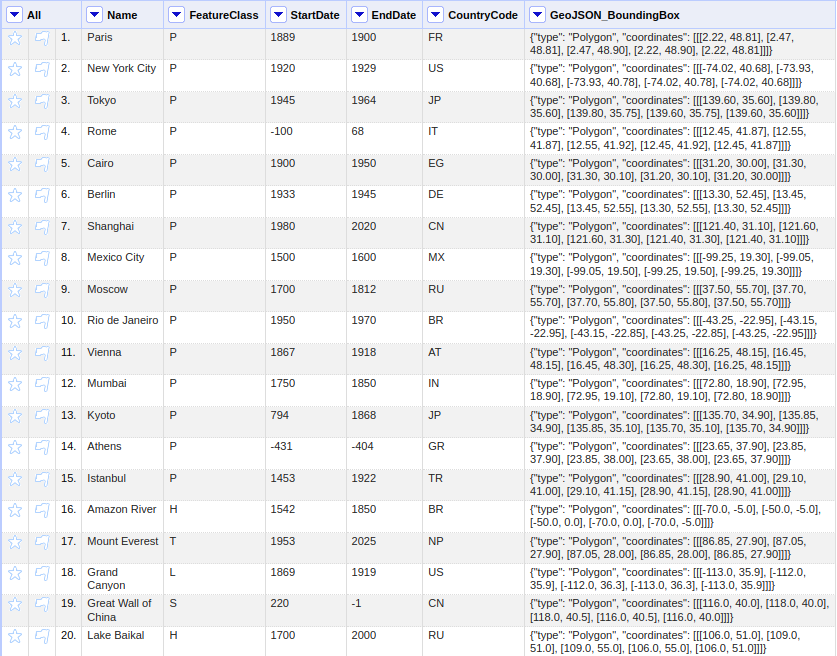
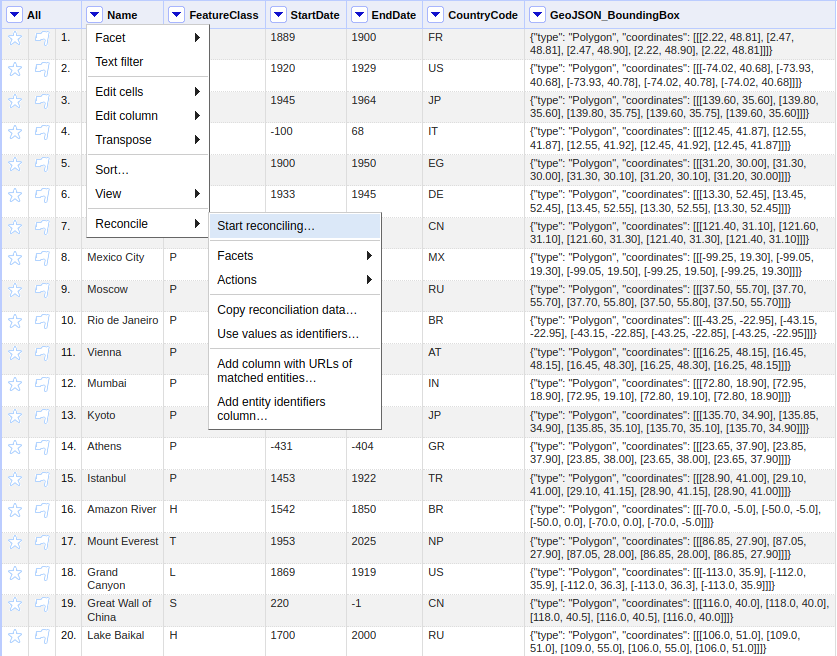
Click on the selector button in the column header containing place names, and select Reconcile → Start reconciling…
In the reconciliation dialog, click Add Standard Service (bottom left)
Enter your personalized reconciliation service URL from your WHG Profile page (see below)

Click Add Service
The WHG reconciliation service should now appear in the list of available services.
2.2.13.3. Step 2: Configuring Reconciliation Parameters
After selecting the WHG service, you can configure various parameters to improve matching accuracy:
Reconcile each cell to: Select “Place” (the default entity type)
Optional: Also use relevant details from other columns: Check boxes for any columns containing additional context (e.g., country names, dates, coordinates)
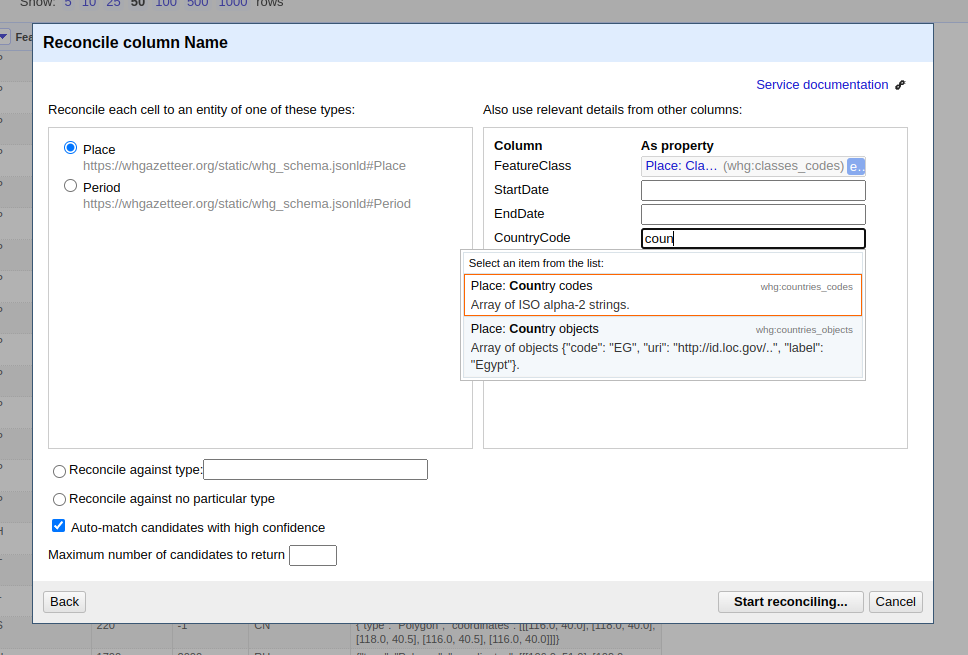
2.2.13.4. Step 3: Running Reconciliation
Click Start Reconciling
OpenRefine will send your place names to the WHG API in batches
Results will appear in your column with confidence scores
Results may include places from multiple sources (WHG, GeoNames, TGN) — the source namespace is encoded in the entity ID
2.2.13.5. Step 4: Reviewing and Confirming Matches
Click on cells showing multiple candidates
Review the suggested matches in the popup dialog
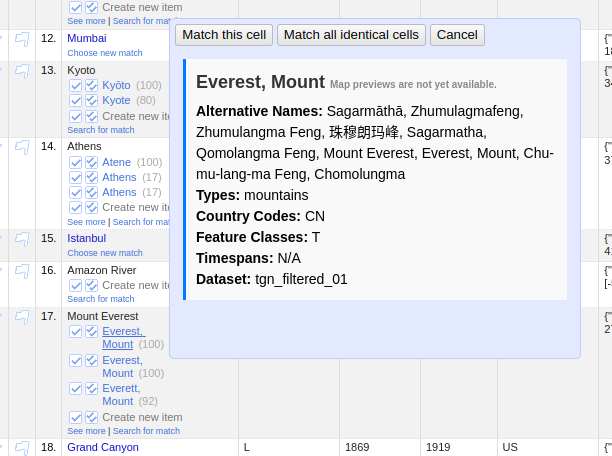
Select the correct match or choose “Create new item” if none match
Use Reconcile → Actions → Match each cell to its best candidate for bulk acceptance (use carefully!)
2.2.13.6. Step 5: Data Extension (Enrichment)
After reconciliation, you can add properties from WHG to your dataset:
Click the reconciled column header
Select Edit column → Add columns from reconciled values…
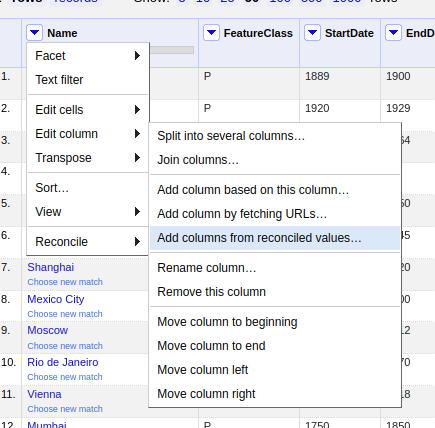
Choose properties to add (see Data Extension Properties for the full list)
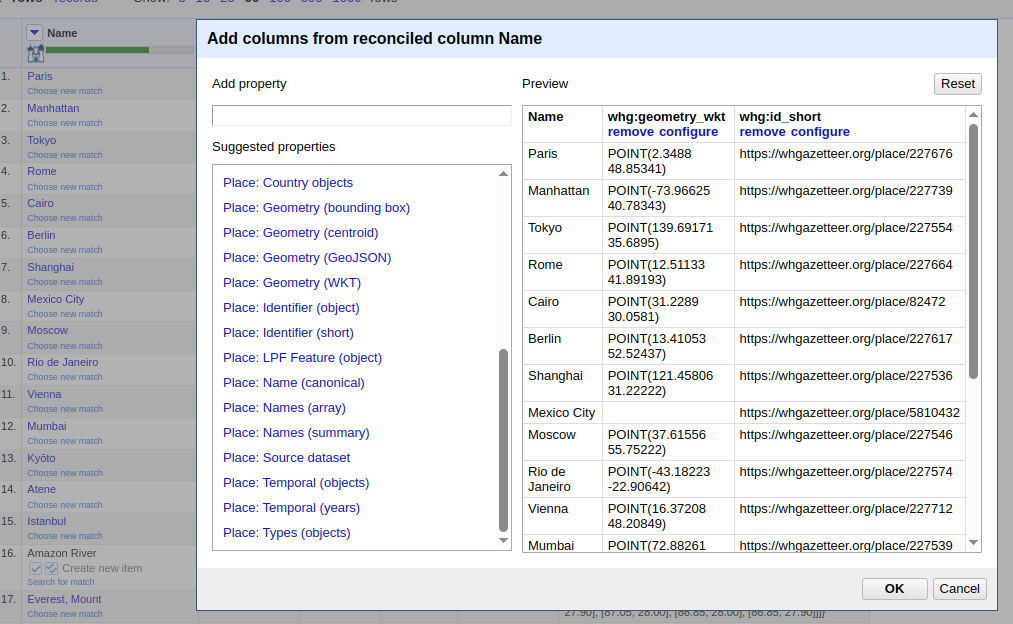
Click OK to add the new columns
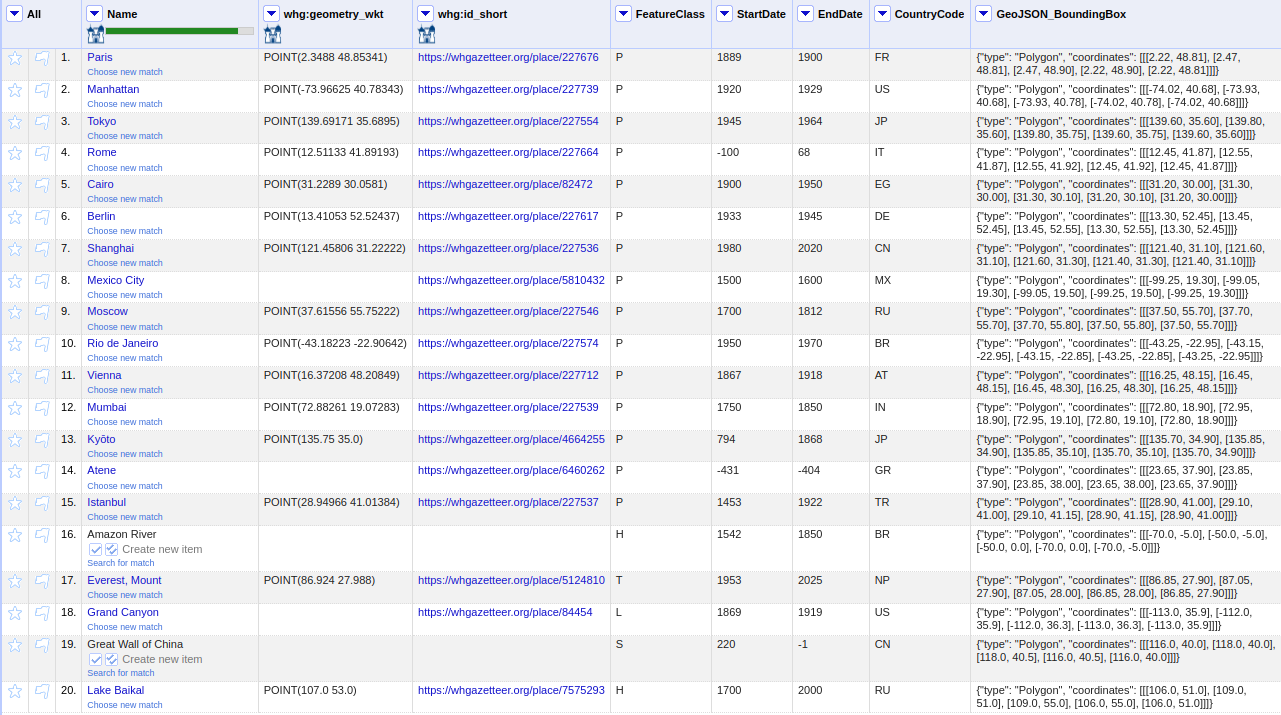
Note: Data extension works for places from all sources. For some sources, certain properties (e.g.
whg:geometry_wkt,whg:temporal_objects) may return empty values if the source data does not include them.
2.2.13.7. Tips for Better Results
Pre-process your data: clean up obvious typos, normalise formatting, and rewrite inverted index forms (
Mantaro, Rio→Rio Mantaro) into natural order.Put the place name alone in the reconciled column. A cell reading
Bego, Beriut, Syriais matched as one long name — see The Query Model. Split the container out into its own column.Filter by country:
whg:countries_codesis the one geographic constraint available through OpenRefine, and it is worth using for common toponyms.Filter by namespace: if you know your places come from one source, restricting to it is faster and more relevant.
Be careful with temporal filters.
start/endare hard filters, andundated=trueonly admits records carrying no dates — it does not widen the window. Because most modern GeoNames and OSM records do carry dates, a medieval-only window can drop nearly every valid hit. Prefer treating period as a post-hoc disambiguator; see Filter Behaviour and Common Pitfalls.Start with a sample: test on a small subset before processing a large dataset.
Review auto-matches:
scoresaturates at ~100 for the best candidate in every query, so a column full of 100s says nothing about quality. Spot-check common place names in particular, and see Deciding Whether a Result Is Ambiguous.
2.2.13.8. Batch Reconciliation via API
For programmatic access or very large datasets, you can use the WHG Reconciliation API directly. See the full API documentation for details on query structure and response formats.
Before writing a bulk client, read Batching, Quotas and Retries above — it covers how many queries fit in one request, how the daily quota is counted, and how to handle errors without hammering the service.
2.3. Source Terms and Attribution
WHG aggregates place data from more than two dozen source gazetteers, and they do not share a single licence. GeoNames is CC-BY, Wikidata is CC0, OpenStreetMap is ODbL, Getty TGN is ODC-By, several contributed gazetteers are non-commercial, and a few carry one institution’s bespoke terms. There is deliberately no blanket licence over the aggregate: each source carries its own, and WHG’s curation licence is asserted alongside those terms, never instead of them.
A single API response can therefore span several licences at once. So that you can comply with each
one without a second lookup, every multi-record response carries an attribution object at its
root.
2.3.1. Where it appears
Endpoint |
Attribution |
|---|---|
|
|
|
|
|
an |
|
an |
|
standalone resolver — query terms for arbitrary namespaces or ids |
2.3.2. Shape
{
  "attribution": {
    "sources": {                      // keyed by authority namespace
      "gn": {
        "name": "GeoNames",
        "citation": "GeoNames geographical database. https://www.geonames.org/",
        "record_count": 13378039,
        "rights_holder": "",
        "source_url": "https://www.geonames.org/",
        "license": {
          "spdx_id": "CC-BY-4.0",
          "label": "Creative Commons Attribution 4.0 International",
          "url": "https://creativecommons.org/licenses/by/4.0/",
          "permits_commercial": true,
          "share_alike": false,
          "attribution_required": true,
          "no_derivatives": false,
          "custom": false
        },
        "redistributable": true       // may WHG hand you this source's records?
      }
    },
    "datasets": { /* keyed by dataset label, same shape; present only when the */
                  /* response contains contributor-uploaded WHG data          */ },
    "whg": {                          // WHG's own curation/aggregation licence
      "spdx_id": "CC-BY-NC-4.0",
      "label": "Creative Commons Attribution-NonCommercial 4.0 International",
      "url": "https://creativecommons.org/licenses/by-nc/4.0/"
    }
  },
  "features": [ /* … */ ]
}
Records served from WHG’s own database use the pseudo-namespace whg; their rights live on the
contributing dataset, so they appear under datasets (keyed by dataset label) rather than
sources. The datasets key is omitted entirely when a response contains no such records.
2.3.3. redistributable — which matches you will be able to fetch
redistributable answers a narrower question than the licence does: may WHG hand you this
source’s own records? For three sources on production today — kain_par, nl and chgis — the
answer is false, and
/entity/{type}:{id}/api refuses them with 451.
Check it before you fetch. The usual shape of a reconciliation workflow is match, then retrieve the matches, so without this flag you would discover the refusal only after committing to a batch of matches — one request per candidate, all of them failing.
Note
The licence does not tell you this. custom-ukds-eul describes the rights holder’s terms; it does
not say that WHG specifically may not re-serve the record. Only redistributable does.
Two things it is not:
Not a statement that the source is unsearchable. These sources remain fully searchable and reconcilable, and always will be — reconciliation runs server-side and never hands you the source’s own content. Do not drop them from your
namespacesfilter, and do not read an absent candidate as evidence of anything.Not the same as
downloadable. That governs the bulk-download affordance and is frequentlyfalsefor reasons of volume alone. It is not reported here and predicts nothing about whether an individual record can be dereferenced.
2.3.4. Mapping a result to its terms
Each reconciliation candidate carries a namespace field naming the source it came from:
{ "id": "place:gn:745044", "name": "Abergavenny", "score": 91.2,
  "match": true, "namespace": "gn", "…": "…" }
Look that up in attribution.sources[namespace] — or, when namespace is whg, in
attribution.datasets. For the other endpoints, the namespace is the prefix of each record’s id
(see Source Namespaces).
2.3.5. namespaces_searched
Reconciliation responses also report which sources were searched, not merely which returned hits:
{ "q0": { "result": [ /* … */ ], "namespaces_searched": ["gn", "chgis", "whg"] },
  "attribution": { /* … */ } }
This matters for compliance. A source can be searched, match nothing on that particular query, and
still be one whose terms govern your workflow — so attribution.sources is built from the searched
set, not from the candidates that happen to come back. An empty result set is not evidence that a
source was not consulted.
2.3.6. The tri-state flags — null does not mean false
Warning
permits_commercial and no_derivatives are true, false, or null. Do not coerce them to
booleans: in most languages null is falsy, so a naive test silently converts “the rights holder
has said nothing” into “the rights holder forbids it”.
Value |
Meaning |
|---|---|
|
The licence grants this. |
|
The licence withholds this. |
|
The rights holder states no position either way. |
null means unstated by the rights holder, not unknown to WHG. The distinction is actionable:
the first is a question you can put to the rights holder, whereas the second would be a defect in
WHG’s metadata and worth reporting to us.
The live example is UN Geospatial boundary data (un), which is published with a
boundary-designation disclaimer and no grant of rights at all. Reporting
permits_commercial: false there would assert a restriction that the UN has not made, exactly as
true would assert a permission it has not given.
Test for null before treating either flag as a boolean:
lic = attribution["sources"]["un"]["license"]

if lic["permits_commercial"] is True:
    ...   # cleared for commercial use
elif lic["permits_commercial"] is False:
    ...   # excluded from commercial use
else:
    ...   # no grant either way — ask the rights holder before relying on it
2.3.7. The flags that carry obligations
share_alikeis the one most likely to affect your own work. ODbL (OpenStreetMap, OpenHistoricalMap) and CC-BY-SA (GB1900, Index Villaris, Trismegistos and others) permit commercial use but attach a copyleft obligation: broadly, a derivative database you distribute must be offered under the same terms. ODbL’s copyleft attaches to the database rather than necessarily to an application that merely displays the data; CC-BY-SA reaches adaptations of the content itself. Roughly 43% of WHG’s indexed records are share-alike.attribution_requiredrecords a legal condition, not a courtesy. A source that would merely appreciate credit reportsfalse; WHG still attributes it, but you are not obliged to.custommarks bespoke, non-SPDX terms. Readlicense.urland the source’srights_holderbefore relying on such data — some forbid redistribution entirely, which is stricter than any Creative Commons licence. Where a source’s terms forbid WHG redistributing its records, the Entity API answers451rather than serving them.
2.3.8. The WHG overlay
attribution.whg is WHG’s own licence over its curation, linkage and aggregation work. It is
asserted in addition to each source’s terms and never replaces them: it grants you nothing over
the source records themselves, and it does not restrict data whose own licence is more permissive.
Note
Licence metadata is verified against each upstream source and corrected at ingest, but WHG is an
aggregator rather than the rights holder for most of this data. For anything consequential, follow
license.url and source_url to the source’s own terms.
2.4. API Tokens
Registered users can generate an API token from their Profile page. Alongside the token, the Profile page also provides a preconfigured OpenRefine reconciliation service URL, which can be copied and pasted into OpenRefine’s reconciliation dialog, under “Add Standard Service”.

2.4.1. Using an API Token
The simplest way to use an API token is to include it as a query parameter in the request URL. For example:
https://whgazetteer.org/reconcile?token=<token>
Otherwise, it may be included in the Authorization header, using the Bearer schema.
Requests must also include a User-Agent header, or our bot-filters will reject them. Make it
one that identifies your client — a name, a version, and a way to reach you:
Important
Do not send a literal placeholder such as bot, notbot, client or test. Earlier versions of
this page used notbot in the example below, and clients understandably copied it verbatim. A
generic value tells us nothing, and when a bulk job starts misbehaving it leaves us no way to warn
you before we throttle it. A good header looks like:
User-Agent: my-project-enrichment/1.2 (+https://example.org; ops@example.org)
For example:
curl -X POST https://whgazetteer.org/reconcile \
  -H "Content-Type: application/json" \
  -H "Authorization: Bearer <token>" \
  -H "User-Agent: my-project-enrichment/1.2 (+https://example.org; ops@example.org)" \
  -d '{
    "queries": {
      "q1": {
        "query": "London",
        "mode": "fuzzy",
        "fclasses": ["A","P"],
        "start": 1200,
        "end": 2050,
        "undated": true,
        "countries": ["GB","US"],
        "namespaces": "whg",
        "bounds": {
          "type": "Polygon",
          "coordinates": [[
            [-1.0,51.0],
            [-1.0,52.0],
            [0.5,52.0],
            [0.5,51.0],
            [-1.0,51.0]
          ]]
        },
        "limit": 5
      },
      "q2": {
        "query": "Rio Mantaro",
        "countries": ["PE"],
        "fclasses": ["H"],
        "limit": 3
      }
    }
  }'
Note
Send as many queries in one request as you have names, up to the manifest’s
batch_size of 50 — the quota is charged per request, not per query. See
Batching, Quotas and Retries.
2.4.2. Suggest Endpoint Example
curl "https://whgazetteer.org/suggest/entity?prefix=Edin&limit=5&countries=GB&fclasses=P&namespaces=whg&token=<token>"
2.4.3. Entity API Example
# Fetch a GeoNames place as LPF
curl "https://whgazetteer.org/entity/place:gn:745044/api?token=<token>"

# Fetch a WHG place as LPF
curl "https://whgazetteer.org/entity/place:169687/api?token=<token>"

# Preview HTML snippet for a place
curl "https://whgazetteer.org/entity/place:gn:745044/preview?token=<token>"